Your customers know what they want. Your site usually doesn’t.
Herm helps your site decide what to show each connected shopper next, without taking custody of their profile. Send the products, offers or messages you already have. The Decision API sends back the order that fits best.
In-session. Shopper-controlled. Decisions, not data.
30-min Decision API walkthrough
Best suited to brands with signed-in customers.
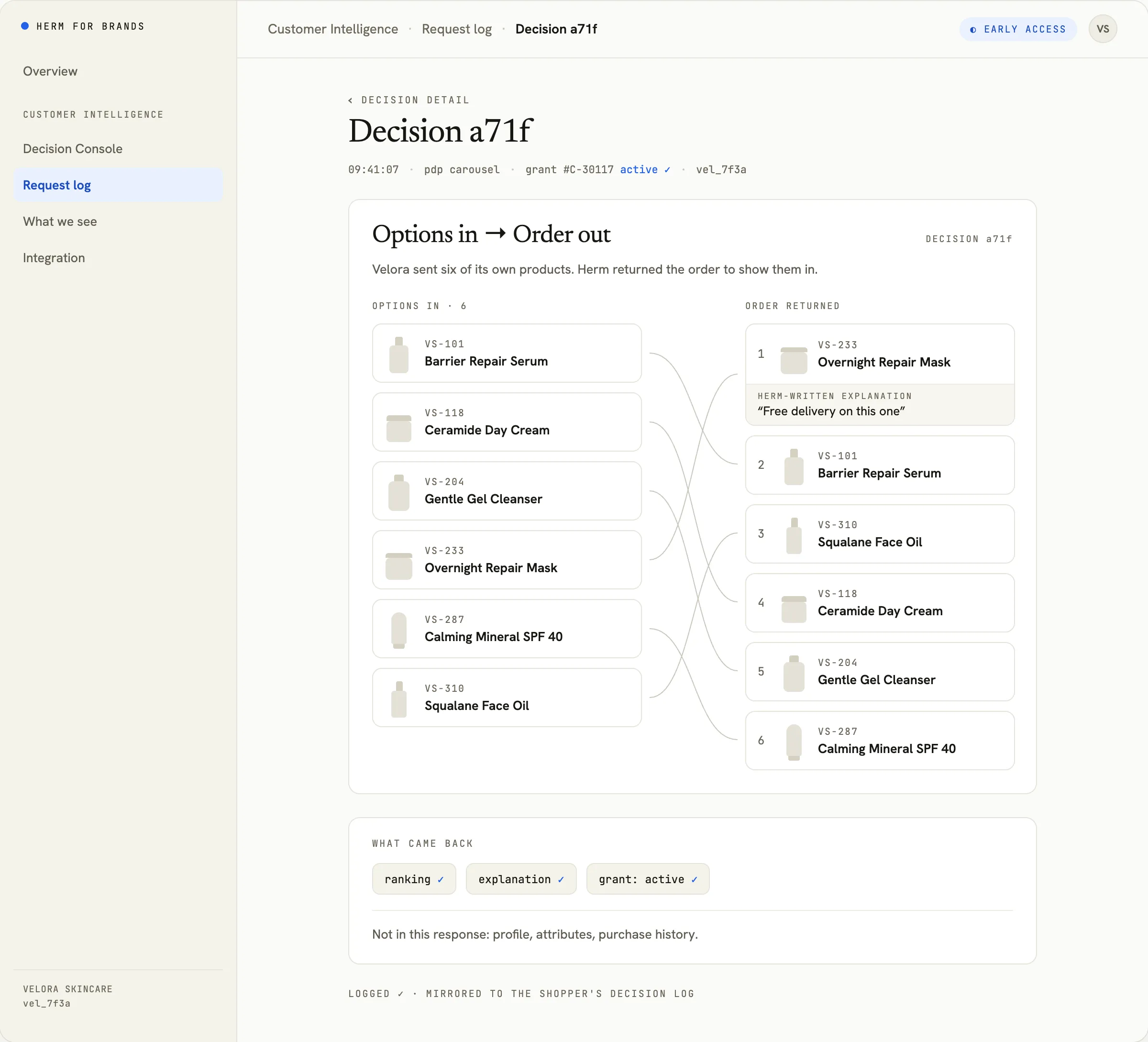
- Decisions, not profiles. Your brand gets a ranking or selection of options it already owns.
- In-session only. Decisions happen while a signed-in, connected shopper is on your site.
- IDs that work only for you. Every brand gets a different connection ID for the same shopper.
- Shopper-controlled. Shoppers choose what’s used and for how long, and can revoke at any time.
The shopper brings context. Most sites start from scratch.
Your own customer data tells you what happened with your brand. It can’t always tell you what matters to this shopper right now. Customer Intelligence lets your site use the context a shopper has allowed in Herm to make a better decision, without receiving their profile.
Without a Herm connection
Your site knows
- the signed-in customer
- the current page
- the basket
- its own order history
Six products your site could show
- VS-101
- VS-118
- VS-204
- VS-233
- VS-287
- VS-310
Your site chooses from its own context.
With a Herm connection
Six products your site could show
- VS-101
- VS-118
- VS-204
- VS-233
- VS-287
- VS-310
Herm ranks them using what the shopper allowed
Order returned
4 · 1 · 6 · 2 · 3 · 5
- VS-233
- VS-101
- VS-310
- VS-118
- VS-204
- VS-287
Each number is a position in the list you sent, so 4 means your fourth option goes first.
Your site gets back the order to show them in. The shopper’s profile stays in Herm.
Herm adds to your first-party data. It doesn’t replace it.
Ask “which of these?” Never “who is this?”
Your site already knows what it could show. Customer Intelligence helps decide the order. Send Herm your options and the connection ID for the signed-in shopper. Herm returns a ranking or selection. No profile lookup. No attribute response. No audience export.
The decision moves. The shopper profile doesn’t.
POST /v1/decision

request {
  connection_id: "vel_7f3a",
  context: "pdp",
  options: ["VS-101", "VS-118", "VS-204", "VS-233", "VS-287", "VS-310"]
}

response {
  ranking: [4, 1, 6, 2, 3, 5],
  explanations: ["Free delivery on this one"],
  grant: "active"
}

no grant → response {
  grant: "none"
} 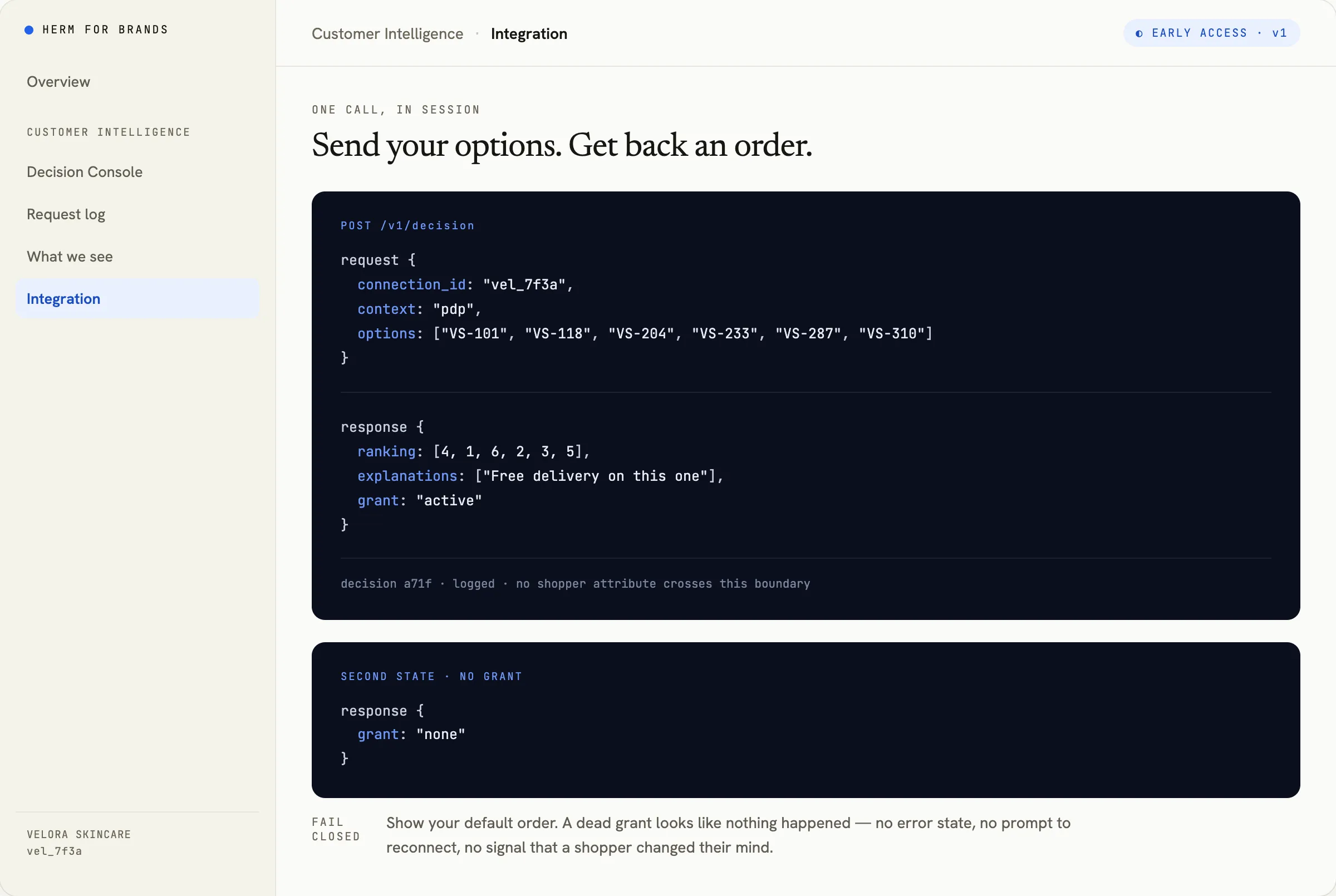
No active grant? The response says so, and your site shows its default order: no error, no prompt to reconnect, no sign the shopper changed their mind.
One decision. Wherever the shopper is choosing.
The primitive stays the same. Your surface sends its available options. Herm returns what to show first.
Options in The Decision API Decision out
-
Product carousel
Which products should move to the front?
Options in 6 options
Send the products already eligible for the page. Herm returns the order for this connected shopper. Your commerce stack still controls stock, merchandising and rendering.
Decision out the order to show them in
-
Your own AI assistant
Which answer fits this shopper best?
Options in 9 options
Your assistant sends the products, services or responses it’s considering and uses the returned order to answer. The shopper’s profile is never exposed to the assistant.
Decision out the order to show them in
-
Offer slot
Which eligible offer should this shopper see?
Options in 3 options
Send the offers already eligible for the session. Herm ranks them. No audience file, no shopper profile.
Decision out the order to show them in
See it on your own surfaces.
The connection starts with the shopper.
Herm has its own relationship with the shopper. When your brand gives them a reason to connect, they decide what your brand may use and for how long. Only then can your site ask Herm for decisions in their signed-in sessions.
A useful connection is earned, not silently assembled.
Permission is two decisions, not one checkbox.
-
1
A reason worth saying yes to
A perk like free delivery while connected is the strongest start. It’s recommended, not required.
-
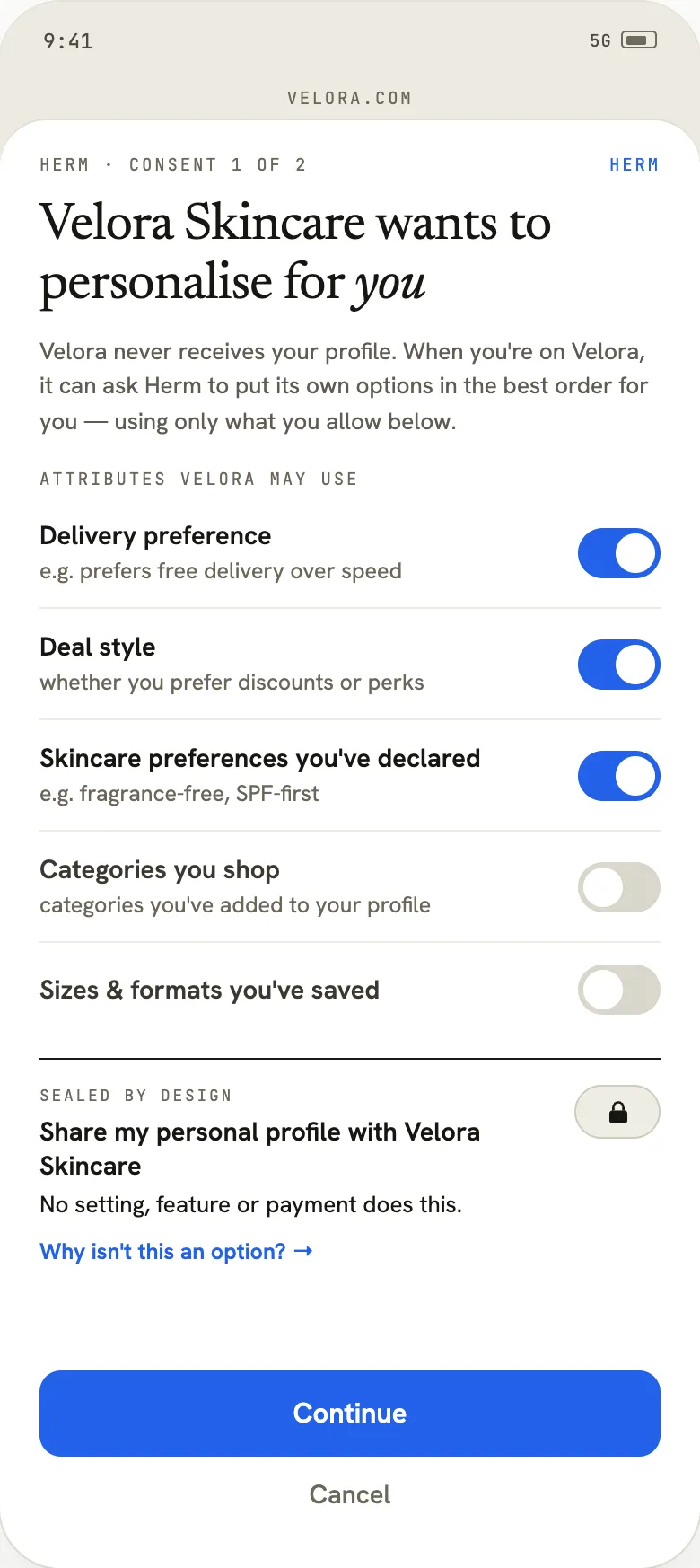
2
What your brand may use
Shoppers switch individual options on or off.
-
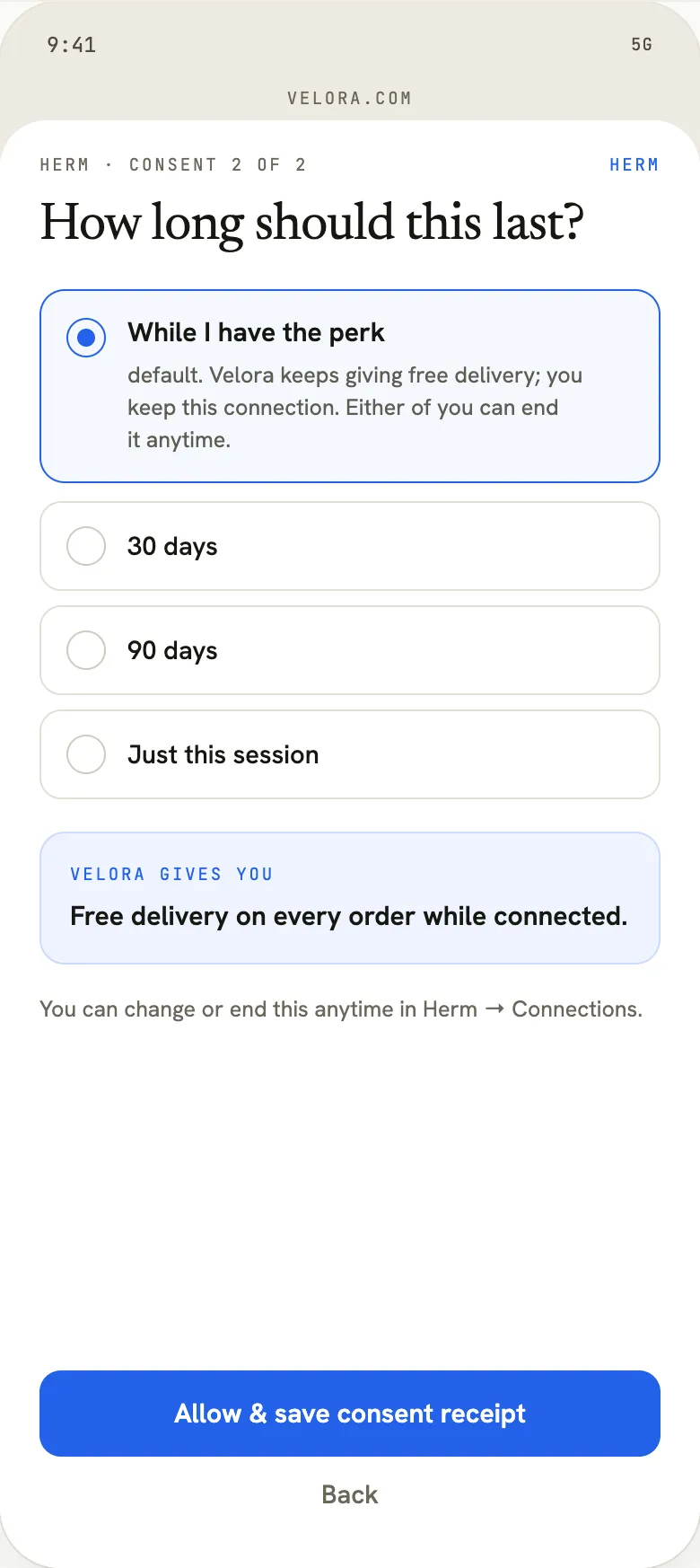
3
For how long
While the perk is active, this session, 30 days or 90 days.
-
4
Connected
A consent receipt is saved, and your brand is issued a connection ID that works only for you.
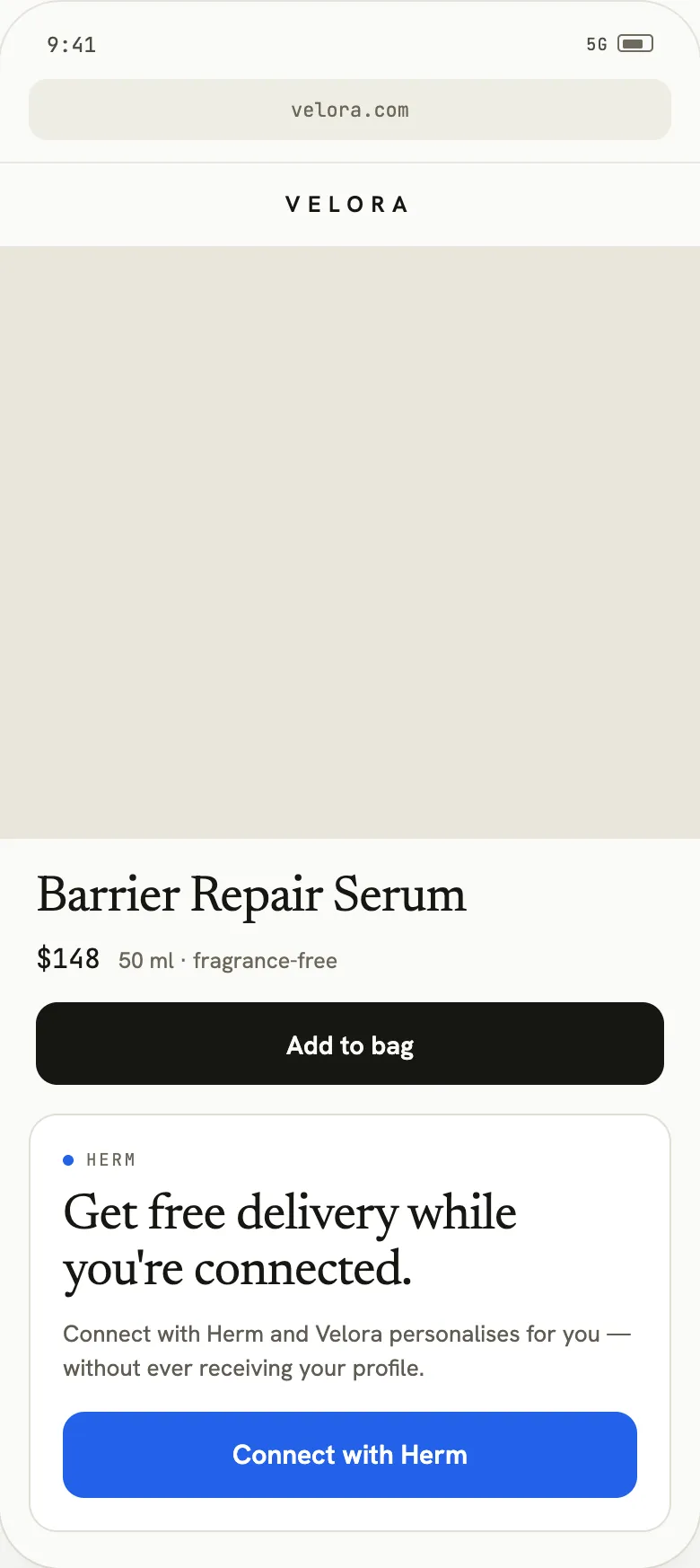
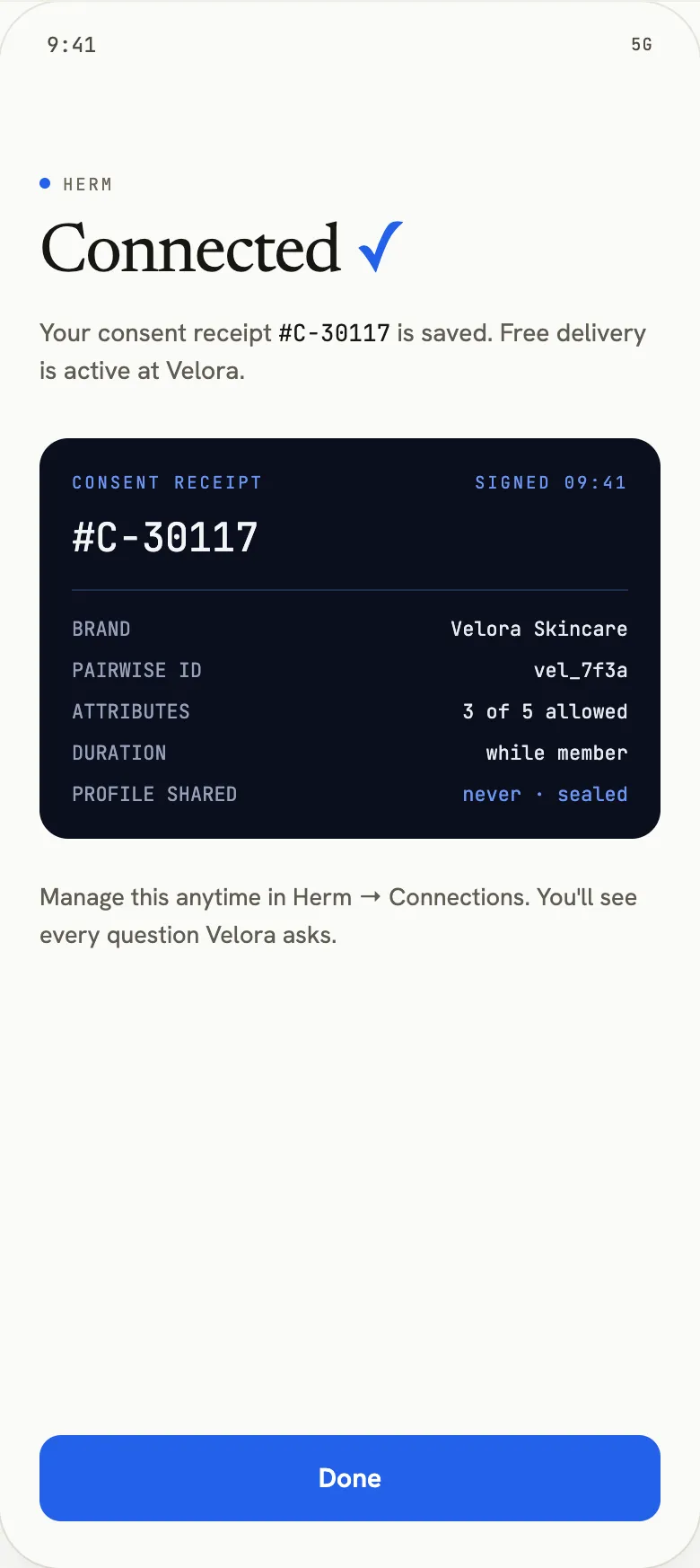
Herm product screen · illustrative brand and data
Every grant has a visible life. Every decision is logged for the shopper. Revoking stops future decisions immediately.
Your brand gets the decision. Not the dossier.
The information needed to make the decision stays inside Herm. Your systems get what they need to act, not a new customer-data payload to warehouse.
One request, two logs
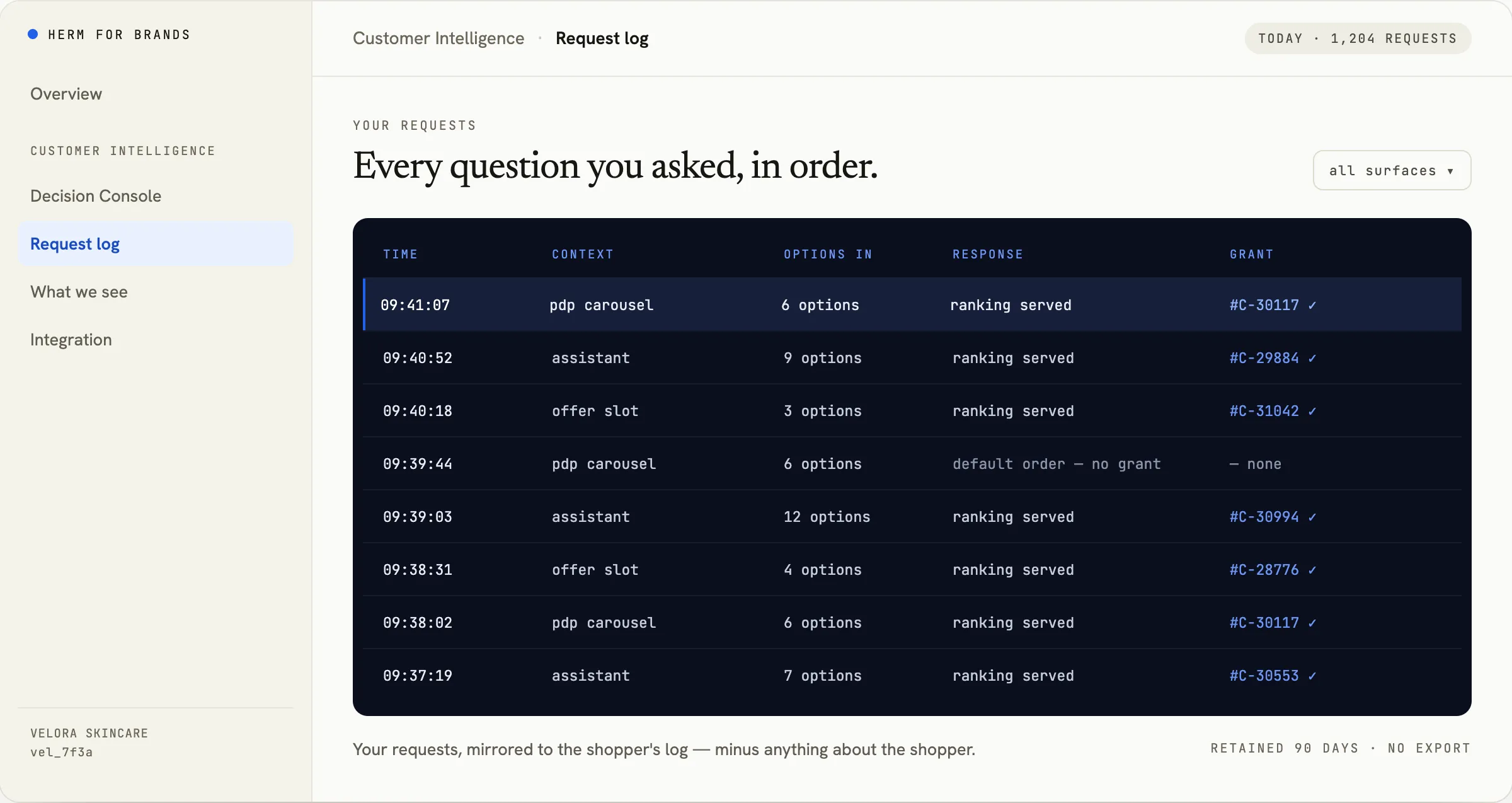
Every decision your site requests appears in your log and in the shopper’s. Yours shows the surface, the options you sent and the grant it ran under. Theirs also shows which of the things they allowed were used. Yours never does.
Your log
The shopper’s log
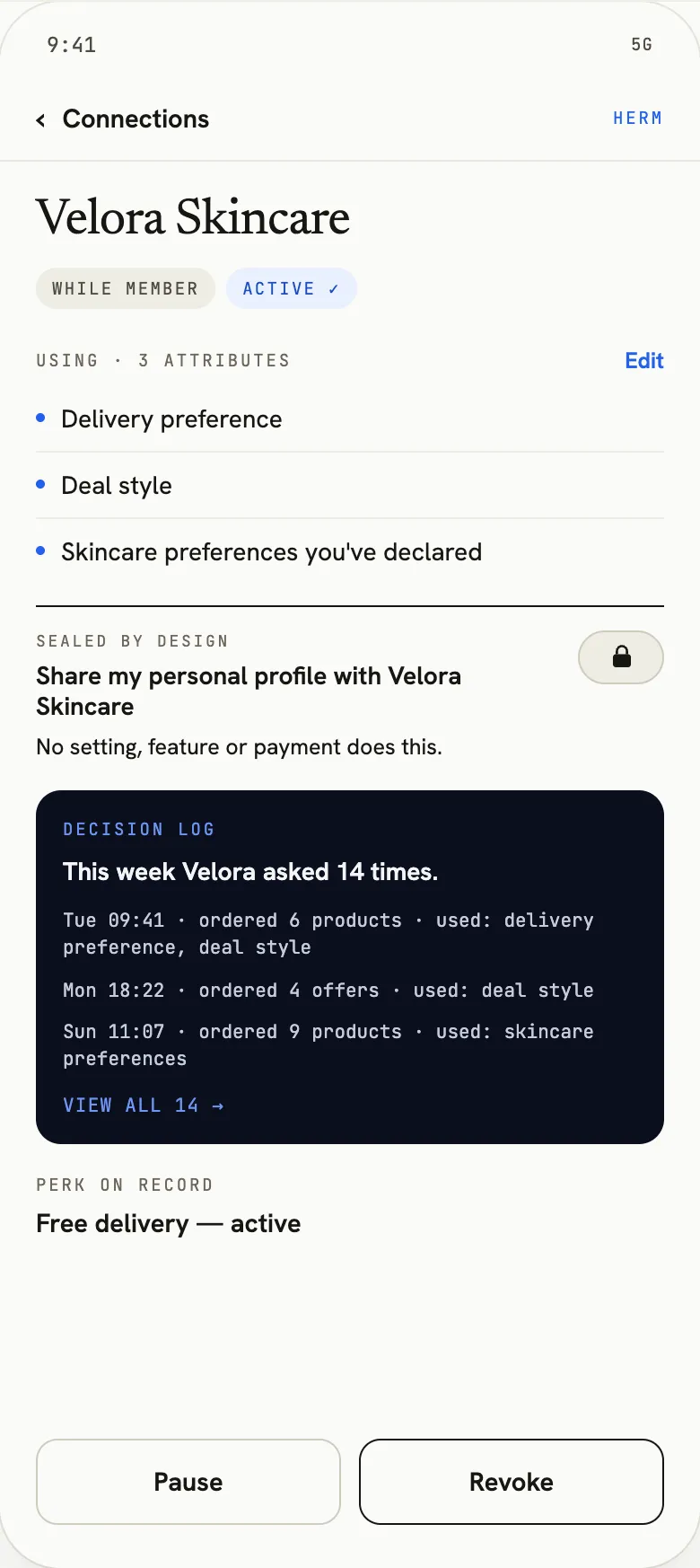
Same request: 09:41, product carousel, six options, grant #C-30117. Herm product screen · illustrative brand and data
Your brand receives
- Rankings of your own options. The products, offers or messages you sent.
- A selection. When you need one pick rather than a full order.
- Short explanations. Written by Herm, using only what the shopper allowed.
- Your request log. Every decision your brand asked for.
- A connection ID. Different for every brand, used to request decisions.
Your brand never receives
- The shopper’s Herm profile. There’s no profile endpoint.
- Shopper attributes. There’s no attribute lookup.
- Purchase history. There’s no purchase or receipt export.
- A cross-brand identity. Each brand gets a different ID, so Herm IDs can’t be matched across brands.
- Audiences or lists. There’s no bulk, CRM or email-list mode.
No export. No bulk endpoint. No batch mode.
Add one decision to the experience you already own.
- 01
Connect.
The shopper grants your brand permission through Herm. Herm issues a connection ID that works only for your brand.
- 02
Decide.
In a signed-in session, your site sends that ID and the options it could show. Herm returns the order.
- 03
Render and measure.
Show the order in your own experience, and measure it in the analytics you already use.
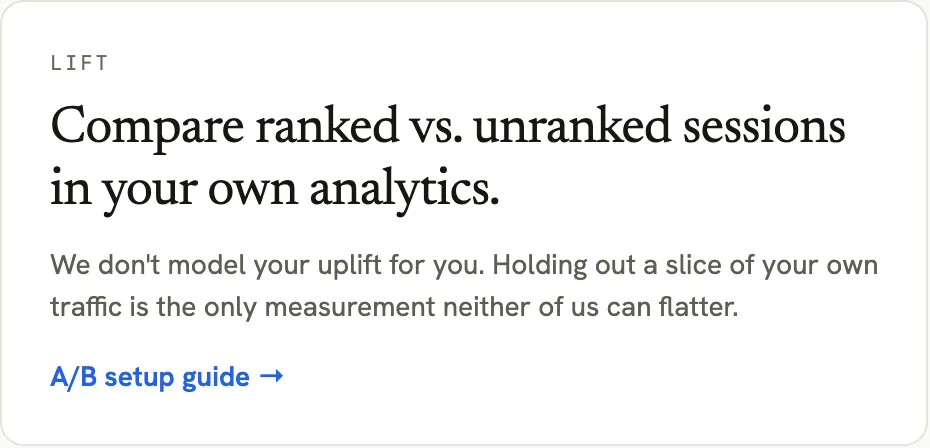
Let your own conversion data settle it.
Herm doesn’t ask you to trust a modelled lift estimate. Compare Herm-ranked sessions with your own unranked baseline.
Eligible signed-in sessions
Your existing experience
Herm-ranked experience
- product clicks
- add to basket
- conversion
- revenue
Your experiment. Your analytics. Your conversion data.
Strongest when you already know who’s in the session.
Early Access is built for brands with signed-in customer experiences: accounts, memberships or other logged-in journeys where a Herm connection can resolve in the moment.
- signed in ✓
- connected ✓
- grant active ✓
- in-session only
Good fit today
- signed-in ecommerce experiences
- customer accounts and memberships
- product carousels on your own site
- your own AI assistant
- offer slots
Not the current product
- anonymous visitor personalisation
- CRM list enrichment
- email audience ranking
- batch customer scoring
- exported shopper profiles
Customer Intelligence is rung three: making your own experiences more relevant to the connected shopper in front of you. You don’t have to start at rung one. Start here when on-site personalisation and conversion are the problems your team owns.
See AI Commerce Readiness →- Be Visible Brand Visibility Live Does AI know and recommend you?
- Be Sellable Product Readiness Live Can AI actually complete the recommendation: specs, price, stock, where to buy?
- Be Relevant Customer Intelligence Early access Are your own experiences right for the shopper in front of them?
- Be Preferred Offers Live Do the shoppers who buy your category buy you, and keep buying you?
Common questions
What does my brand actually receive?
A ranking or selection of the products, offers or messages you sent, optionally with a short explanation written by Herm, plus the connection ID issued when a shopper connects. The Decision API doesn’t return the shopper’s Herm profile, purchase history or attributes.
Can we export attributes to our CRM, or rank our email list?
No to both. Customer Intelligence is no longer an attribute-export or CRM-enrichment product, and there’s no batch or audience mode. Decisions happen in signed-in sessions while the shopper’s connection is active.
How do shoppers get connected?
You place Connect with Herm on your site, ideally with a reason worth saying yes to (free delivery while connected, for example). A perk is recommended, not required. Shoppers choose what your brand may use and for how long, and every connection gets a consent receipt.
How does our site identify a connected shopper?
When the shopper grants permission, Herm issues your brand a connection ID. You store it against your own customer account and send it with each decision request. Every brand gets a different ID for the same shopper, so it isn’t a Herm-wide identifier.
What happens when a shopper isn’t connected, or revokes?
The Decision API tells you there’s no active grant, and your site shows its default order: no error, no prompt to reconnect, no sign the shopper changed their mind. Revoking takes effect immediately.
What can the shopper control?
What your brand may use, how long the connection lasts, and whether to revoke it. They can also see every decision requested under their grant.
How do we measure the impact?
In your own analytics. Compare Herm-ranked sessions with your existing experience on the outcomes that matter to you. Herm doesn’t give you a modelled lift number.
Do we need an AI assistant?
No. A product carousel is the simplest place to start: send the products eligible for the page and show them in the order Herm returns. The same API also works for your own assistant or an offer slot.
Your site already has options. Give it a better way to choose.
See how the Decision API could fit your signed-in customer experience, from the shopper connection to the decision call and measurement in your own analytics.
30-min Decision API walkthrough
What happens in the 30 minutes
- We map which of your surfaces can send options in signed-in sessions.
- We walk through a decision in the product: request, response, the no-grant default and the shopper’s log.
- We plan how shoppers will connect, and how Early Access works for your brand.